Aix is a unix based os developed by IBM and was originally released in the mid 80s for PC RT. When IBM released the RS/6000 in 1992, it released AIX 3.1 and built in is a mksysb script to do a full rootvg or OS backup. Other volume groups are not touched by this script. It was aimed at scsi tape drives. When booted from tape, the system would be restore rootvg to exactly what it contained when it was backed up. When finished, the system reboots. IBM never supported writing to cd but went directly to dvd. A mksysb can be written to dvd and then booted and restored from dvd. This function would be VERY helpful to linux releases or unix released. What was described earlier is simillar to a product in AIX called Network Install Manager - nim. Using nim, a root user can do a bootable backup to a remote system and then restore from that system. A nim restore is the fastest form of installing AIX and is used by manufacturing to preload systems. Today, at AIX 6.1, nim and mksysb are mature and trusted processes. Non rootvg volume groups are backed up using savevg. savevg is better than tar as it creates logical volumes the correct size and correctly names the mount points and then restores the data. Again, its a mature process. Even open files are backed up with mksysb and savevg although any save to the file after its backed up isn't reflected. A mksysb has 3 components, A boot image, a complete list of files and the actual backup. When the mksysb is taken, it compares what is on the list to what is on the tape in the backup. They must agree.
Another option is LVM snapshot for your system/important directories and then tar/pipe them to lzma (faster/better than bzip2). You can write the scripts yourself or search for somebody else's on google.LVM snapshotting allows you to also capture the logical volumes and only needs the space that the delta data would require. You can back up the snapshot and ensure a consistent state, then destroy the snapshot.
OPEN SOURCE DISASTER RECOVERY SOFTWARE: http://www.mondorescue.org/
You can also try STORIX but it's not free

Sunday, March 29, 2009

Sunday, February 1, 2009
Ciphering/Encryption
In RHEL 5.2 we can see SHA-1 being used for the ciphering/encryption. It produces 160 bit digest from a message of width max length: (2^64-1) and based on the principles of MD4, MD5 message digest algorithms.
http://en.wikipedia.org/wiki/Sha1
To view the installed cryptographic ciphers in Linux
#cat /proc/crypto
name : crc32c
driver : crc32c-generic
module : kernel
priority : 0
type : digest
blocksize : 32
digestsize : 4
name : sha1
driver : sha1-generic
module : kernel
priority : 0
type : digest
blocksize : 64
digestsize : 20
http://en.wikipedia.org/wiki/Sha1
To view the installed cryptographic ciphers in Linux
#cat /proc/crypto
name : crc32c
driver : crc32c-generic
module : kernel
priority : 0
type : digest
blocksize : 32
digestsize : 4
name : sha1
driver : sha1-generic
module : kernel
priority : 0
type : digest
blocksize : 64
digestsize : 20
Friday, January 30, 2009
Major and Minor numbers
Linux kernel treats all devices as file; they can be opened, closed, read and written using the same standard system calls. For every kind of Block and Character Devices, system creates the device files using mknod command and they define the device as major and minor number.
?? what... major and minor number....
Don't worry, I am going to tell about major and minor number... ;-)
To access any device, Operating System must be told what to do. All the routines for the specific device is jointly referred as Device Driver.
All devices controlled by the same device driver have common MAJOR number. MINOR number is used to identify the different devices and their controllers.
In another language, it can be said that: MAJOR number tells what kind of device it is and MINOR number tells about the characterstics/location of the device.
http://www.linux-tutorial.info/modules.php?name=MContent&pageid=94
?? what... major and minor number....
Don't worry, I am going to tell about major and minor number... ;-)
To access any device, Operating System must be told what to do. All the routines for the specific device is jointly referred as Device Driver.
All devices controlled by the same device driver have common MAJOR number. MINOR number is used to identify the different devices and their controllers.
In another language, it can be said that: MAJOR number tells what kind of device it is and MINOR number tells about the characterstics/location of the device.
http://www.linux-tutorial.info/modules.php?name=MContent&pageid=94
Sunday, January 4, 2009
Concept on SAN and Switches

In above block diagram of SAN system, we can see mulitple servers : AIX, HP, LINUX and may be SUN, WINDOWS etc connected to storage like EMC, SAN, HITACHI (HDS) through Fibre Channel.
In between Servers and Storage, we can see Switches also called as Fabric. This switch allows the soft zoning in between the servers and storage avoiding direct connection between Servers and Storage.
(SOFT ZONING: It is the logical connection rather than hard connection between the servers and storage )
In switch, we can activate and deactivate the created the zone in between Servers and Storage.
Wait!!! I am missing something..
To create the zoning in between the Server and the Storage, you must have WWPN (World Wide Port Name) of either ends.
FYI there is a GUI software called as EFCM for SAN managementt.
==============================================================
Another thing to notice in above block diagram is that, each server goes to storage via two switches. Why should we use multi path?
Simple answer: For redundancy and multi path allows 2X speed of the data transfer.
Now the next question arises: What controls the multipath?
It's the multi-pathing software installed in the Servers. There are various types of mulitpating softwares. Basically there is MPIO (Multi Path I/O) which is default installed in AIX server.
There is another software: SDD (Subsystem Device Driver) that also controls multipath.
It really depends upon your choice to use either MPIO or SDD.
Multipath can also be considered as the technique employed for Load Balancing.
=============================================================
You know there are many questions in my mind.. ;-)
Now how does the Server recognize the different vendors Storage devices?
It's real easy answer.... It's again the software/filesets.. It's like a device driver which we call Host Attachment Software/Package.
Now the bottom line concept for the SAN system to work, there are three softwares running in the servers: OS, Multipathing software and Host Attachment Software.
================================================================
Are you interested in Switch Trunking? If yes, you can go through it, ok.. Otherwise skip it.. :-)

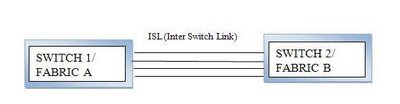
In above block diagram it says ISL (Inter Switch Link). If the two switches are connected via ISL then this is called as Trunking. And both of the switches behave as a single switch. This increases number of possible switching. This also helps in load balancing.
(FYI: If the ports connected by ISL, the port is called as E Port. Similarly if connected by Fiber, the port is called as F Port. If nothing connected , the port is called G Port)
In SAN system, Domain ID represents Switch. Usually you will find the following notation:
97(1) which implies Switch 1 Port 97
Go and find about QLogic and Emulex...
Hey by the way, I am trying to share only my knowledge. Don't rely 100% in it.. bcoz technology is ever changing. I am trying to update my every postings.
(FYI: If the ports connected by ISL, the port is called as E Port. Similarly if connected by Fiber, the port is called as F Port. If nothing connected , the port is called G Port)

There can be more trunking lines in between two switches for efficient load balancing and efficient switching.
In SAN system, Domain ID represents Switch. Usually you will find the following notation:
97(1) which implies Switch 1 Port 97
Go and find about QLogic and Emulex...
Hey by the way, I am trying to share only my knowledge. Don't rely 100% in it.. bcoz technology is ever changing. I am trying to update my every postings.

Saturday, January 3, 2009
WWPN (World Wide Port Name)
(WorldWide Port Name) The unique serial number burned into Fibre Channel adapters that identifies that network port from all others. The WWPN is the Fibre Channel counterpart of the MAC address in Ethernet adapters.
For the pretty clear concept of FIBRE CHANNEL go to :
http://www.pcmag.com/encyclopedia_term/0,2542,t=Fibre+Channel&i=43129,00.asp
For the pretty clear concept of FIBRE CHANNEL go to :
http://www.pcmag.com/encyclopedia_term/0,2542,t=Fibre+Channel&i=43129,00.asp
IBM server series
P series: POWER series (Performance Enhanced With Enhanced RISC)
To run AIX server
i series: To run ios
Power Systems including AS/400, iSeries, and System i
Z series: Mainframe computers (developed only by IBM)
http://www-03.ibm.com/systems/z/hardware/index.html
DS series: for data storage
X series: x86 architectures INTEL processors;
x86 servers for Windows and Linux
e.g for HMC (Hardware Management Console) server
To run AIX server
- IBM Power Blade servers
- IBM Power 520 Express
- IBM Power 550 Express
- IBM Power 560 Express
- IBM Power 570
- IBM Power 575
- IBM Power 595
i series: To run ios
Power Systems including AS/400, iSeries, and System i
Z series: Mainframe computers (developed only by IBM)
http://www-03.ibm.com/systems/z/hardware/index.html
DS series: for data storage
X series: x86 architectures INTEL processors;
x86 servers for Windows and Linux
e.g for HMC (Hardware Management Console) server
Sunday, December 28, 2008
How do I install the Administration web app in TOMCAT?
If you install Tomcat 5.5 binaries, the Administration web app is not bundled with it; this describes how to add the Administration web app to your Tomcat 5.5 installation. (Tomcat 4.1 comes with the Administration web app as part of the binary).
The following refers to a Tomcat 5.5 set up on Windows 2000, so your path names will be different on *nix platforms. In this example, Tomcat 5.5.17 in installed in c:\Program Files\Apache Software Foundation\Tomcat 5.5 (this is my CATALINA_HOME).
Unzip or untar (be careful to use GNU tar) the file containing the administration web app files (eg. apache-tomcat-5.5.17-admin.zip) to a temporary directory, eg. c:\temp.
Copy c:\temp\apache-tomcat-5.5.17\conf\Catalina\localhost\admin.xml to the directory c:\Program Files\Apache Software Foundation\Tomcat 5.5\conf\Catalina\localhost.
Copy the entire directory tree c:\temp\apache-tomcat-5.5.17\server\webapps\admin
to the directory c:\Program Files\Apache Software Foundation\Tomcat 5.5\server\webapps. This is an overlay, so \server\webapps is just pointing you to the \server\webapps, and the admin directory with its contents will be the only thing you see added there.
Add a line to your c:\Program Files\Apache Software Foundation\Tomcat 5.5\conf\tomcat-users.xml file so that you have a user who has admin role. For example, add this line just before the last line (containing ) of the file:
Restart Tomcat.
Now when you visit
http://localhost:8080/admin you should see a page that asks for a user name and password. If you still see the "no longer loaded" error message in your browser, you must either force a full reload of the web page (in Firefox, hold down Shift key while clicking on the Reload button) or just restart your browser completely.
Subscribe to:
Posts (Atom)